
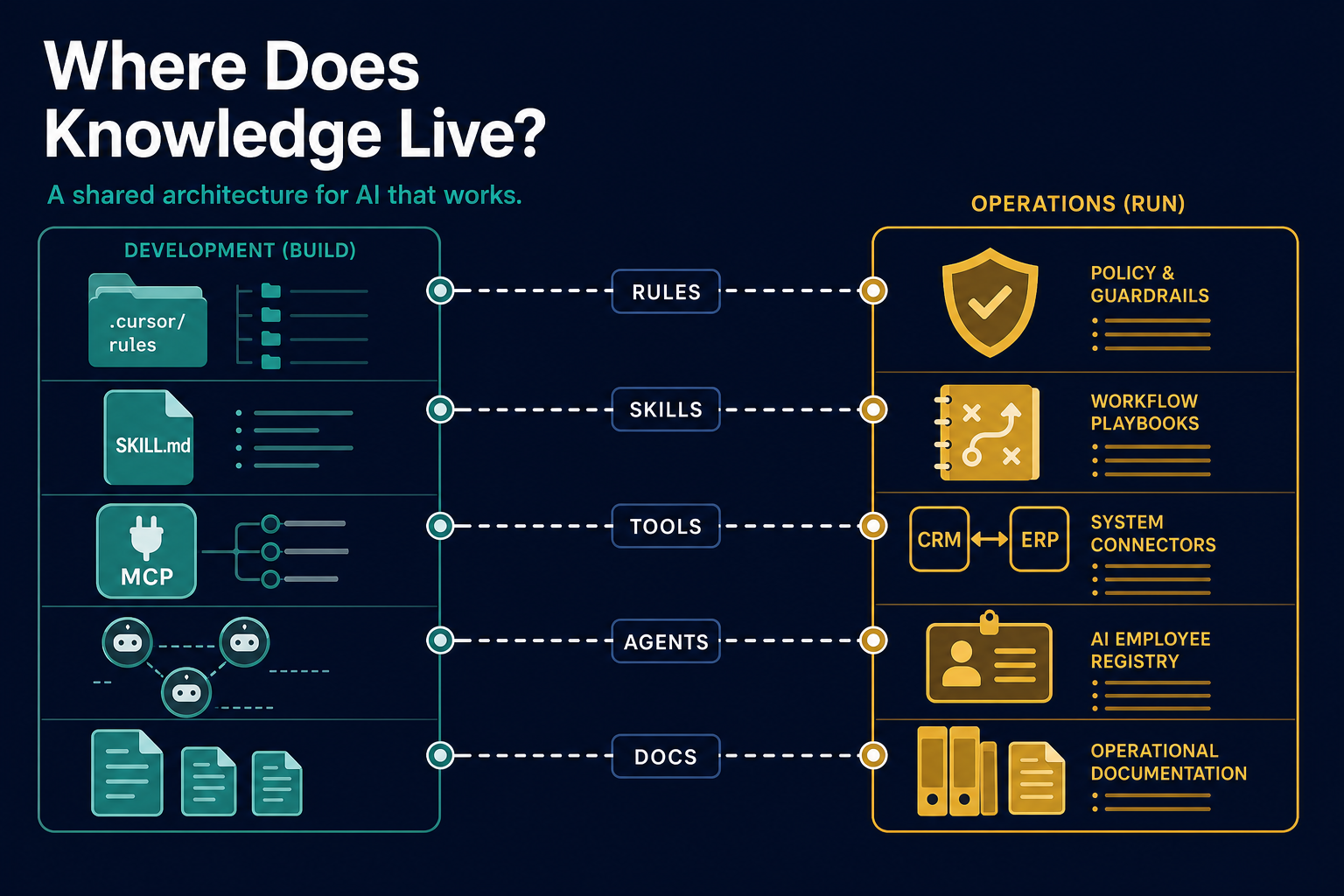
Where Does Knowledge Live?#
A Knowledge Architecture for AI Workers
The problem nobody talks about yet#
You pair-program with an AI assistant for three hours. It finally understands your PST parsing quirks, your test conventions, and why Phase 1 must not touch Postgres yet. You close the laptop. Next morning, it has forgotten everything that lived only in chat.
Or worse: you did write instructions—in a README, a Cursor Rule, a personal note, and a Skill—and now the assistant follows one on Monday and contradicts another on Tuesday.
This is not a model intelligence problem. It is a knowledge architecture problem.
For decades, teams argued about where information should live: comments, wikis, Confluence, ADRs, runbooks, lint configs. AI coding assistants add a new layer—not because the knowledge is new, but because the retrieval model changed. The assistant does not browse your wiki. It receives a composed context window every session: system instructions, project rules, open files, tool outputs, and whatever you explicitly attach.
If you are a solo developer learning tools like Cursor, Claude Code, or Copilot Workspace, you feel this immediately. If you are a Knowledge Manager, Quality Manager, tech lead, or CISO preparing for org-wide adoption, the same confusion appears at enterprise scale—except now it affects compliance, consistency, and audit trails.
This article gives you a practical taxonomy from two angles:
- The development environment — how solo developers and engineering teams configure AI coding assistants (Cursor, Claude Code, Copilot, etc.)
- The operations environment — how organizations deploy AI for business efficiency using terms like AI employee, digital worker, agent registry, skills, rules, and tools
Same words. Related ideas. Different containers. Confusion starts when teams treat them as unrelated vocabularies instead of one knowledge architecture seen from two seats.
Who this is for#
| Reader | What you will take away |
|---|---|
| Solo developer | A clear starter layout so your assistant improves session over session |
| Tech / engineering lead | A vocabulary for code review of .cursor/ and agent config |
| Operations / process owner | How deployed AI workers map to SOPs, policies, and system access |
| Knowledge Manager | How AI context maps to taxonomy, single source of truth, and curation |
| Quality Manager | Where procedures, verification gates, and standards should live |
| HR / workforce planner | Why “AI employee” is a governance label—and what to register |
| Security / compliance | What gets injected into prompts vs what stays in controlled docs |
| Executives evaluating AI tools | Why licensing alone is not a knowledge strategy |
I use Cursor as the teaching example for the dev angle because it exposes these layers explicitly—Rules, Skills, MCP Tools, subagents, hooks. For the operations angle, I use language already appearing in enterprise AI platforms, vendor literature, and workforce governance discussions. The principles transfer even when product vocabulary differs.
Two angles, one architecture#
The same conceptual stack appears in both worlds:
| Conceptual layer | Dev environment (Cursor et al.) | Operations environment (deployed AI) |
|---|---|---|
| Identity | Main chat agent + named subagents | AI employee / agent definition in registry |
| Always-on constraints | Project Rules (.mdc) | Policy guardrails, compliance rules, brand tone |
| On-demand procedure | Skills (SKILL.md) | Workflow skills, playbooks, orchestration steps |
| System access | Tools, MCP, terminal | CRM, ERP, email, database, API connectors |
| Delegated worker | Subagent (explore, custom agent) | Agent instance handling a case or queue item |
| Operational wisdom | .cursor/learn/ | Curated KB articles, exception handling notes |
| Deep reference | docs/, ADRs | SOP library, policy manuals, product specs |
| Lifecycle hooks | Session / tool hooks | Event triggers (ticket opened, EOD batch) |
| Governance record | Git-reviewed .cursor/ | Agent registry, access matrix, audit log |
The insight: when a vendor says “give your AI employee new skills,” they mean the same thing Cursor means by Skills—procedural capability loaded for a matching task—not HR competencies in the human sense. When they say “rules,” they mean non-negotiable constraints, not “rules engine” business logic (though that can overlap).
Organizations that connect these two columns early avoid the most common enterprise failure mode: developers build beautiful agent config in repos while operations deploy duplicate, ungoverned AI workers in SaaS platforms—with no shared taxonomy.
The core insight: layers, not one brain#
An AI coding assistant is not a colleague with perfect recall. It is a stack of context layers with different lifetimes, scopes, and invocation models:
| Layer | Loaded when | Changes how often | Best for |
|---|---|---|---|
| User preferences | Every session, all projects | Rarely | Communication style, personal workflow taste |
| Project rules | Every session in that repo | Occasionally | Stable conventions: tooling, layout, standards |
| Skills | When the task matches the skill description | As workflows evolve | Multi-step procedures: “how to do X” |
| Tools / MCP | Always available; invoked on demand | When integrations change | Actions: run tests, query DB, fetch docs |
| Agents / subagents | Spawned for a subtask | Per delegation | Isolated exploration, specialized workers |
| Hooks | On lifecycle events | Rarely | Deterministic reminders at session start/end |
| Learn / domain notes | Read when relevant | Often (discoveries) | Facts you learned by operating the system |
| Project docs | Read when relevant | Per feature / plan | Specs, architecture, human narrative |
The debate is not “which layer is best.” It is which layer owns which kind of information.
Think of it the way KM teams already think about content types:
- Policy → always applies → Rules
- Procedure (SOP) → apply when doing a named activity → Skills
- Capability → something the system can execute → Tools
- Delegated task → assign to a specialist → Agents
- Lessons learned → accumulated operational knowledge → Learn / wiki distillates
- Reference / specification → deep narrative → Docs
Once you see the mapping, governance becomes familiar instead of exotic.
Define the primitives#
1. Rules — “Always true here”#
What they are: Persistent instructions injected into the assistant’s context—often on every message, or whenever certain files are open.
Cursor example: .cursor/rules/*.mdc files with YAML frontmatter (alwaysApply: true or globs: **/*.py).
Analogues elsewhere:
| Product / concept | Rough equivalent |
|---|---|
| Cursor | Project Rules (.mdc) |
| Claude Code | CLAUDE.md, project instructions |
| GitHub Copilot | .github/copilot-instructions.md |
| Generic | Lint config + “team handbook” excerpts |
Good fit for Rules:
- Folder layout and tooling (“use UV, not pip”)
- Coding standards for matching file types
- Scope boundaries (“Phase 1 does classification only; Postgres is Phase 3”)
- Pointers to where other knowledge lives (“record discoveries in
.cursor/learn/”)
Poor fit for Rules:
- Long multi-step workflows (“when debugging, do steps 1–12…”)
- Volatile facts discovered last week (“99% of PST bodies are empty”)
- Personal writing preferences (belongs in user-level preferences)
Example (from a real project):
# AutoTradeBooking Project Conventions

## Tooling

- Use **UV** for dependency and virtualenv management.
- Run commands: `uv run <command>`.

## Folder Layout

| Path | Purpose |
| docs/ | Design, plans, notes |
| .cursor/rules/ | Cursor agent rules |
| .cursor/learn/ | Domain learnings and operational notes |
That is textbook Rule material: short, stable, universally relevant in that repository.
Design principle: If removing it would cause the assistant to violate project norms on most tasks, it is a Rule. Keep rules thin. They compete for the same context window as your code, chat history, and tool output.
For Quality Managers: Rules are your standards layer—the equivalent of ISO/clinical SOP “always applicable” clauses, but scoped to how work is performed in this codebase.
For Knowledge Managers: Rules should reference, not duplicate, canonical docs. One fact, one home.
2. Skills — “When you are doing X, follow this procedure”#
What they are: Markdown playbooks loaded when the user’s task matches the skill’s description. They encode process, often with checklists, gates, and explicit “stop until approved” steps.
Cursor example: SKILL.md files in ~/.cursor/skills/ (personal) or .cursor/skills/ (project-shared).
Analogues:
| Concept | Equivalent |
|---|---|
| Enterprise KM | Standard Operating Procedure (SOP) |
| Quality systems | Work instruction with verification steps |
| Software delivery | Runbook triggered by incident type |
Good fit for Skills:
- “Brainstorm before building anything creative”
- “Debug systematically before proposing a fix”
- “Create a PR: gather diff, draft summary, run test plan checklist”
- “Summarize uncommitted work, commit with proper message, push”
- Team ceremonies with steps and stop conditions
Poor fit for Skills:
- Static facts about the codebase (use Learn or docs)
- Universal conventions (use Rules)
- One-line preferences
Rules vs Skills — the distinction that matters:
| Rules | Skills | |
|---|---|---|
| Trigger | Automatic (always or file glob) | Intent-based (“user wants a PR”) |
| Content | Constraints and conventions | Procedures and decision trees |
| Typical size | Small (dozens to low hundreds of words) | Can be longer (loaded only when needed) |
| Example | “Use UV” | “Before claiming done, run verification checklist” |
Design principle: Skills are lazy-loaded expertise. They save context and encode how work flows, not what the system is.
For Quality Managers: Skills are where verification gates belong: “do not mark complete until tests pass,” “require human approval before deploy,” “run regression checklist for payment modules.” This is directly analogous to QMS work instructions with mandatory checkpoints.
For Knowledge Managers: Skills are procedural assets. They need owners, version history, and periodic review—same as any SOP library.
3. Tools — “I can perform this action”#
What they are: Callable capabilities—the assistant’s hands. Shell commands, file read/write, browser automation, MCP servers (database query, live API docs, issue trackers).
Analogues:
| Layer | Enterprise parallel |
|---|---|
| Built-in tools (read file, run terminal) | Employee access to systems |
| MCP integrations | Approved API connectors |
| Tool schemas | API contracts |
Good fit for Tools:
- Query live database schema
- Fetch current library documentation
- Run tests, open pull requests
- Search indexed codebase
Poor fit for Tools:
- “Our API returns 404 when…” (that is Learn/docs)
- “Always run tests before commit” (Rule or Skill)
Common mistake: stuffing procedural knowledge into tool descriptions. Tool schemas should describe what the tool does and its parameters. Workflows belong in Skills.
For Security / compliance: Tools define what the agent can touch. Tool allowlists are the new access-control matrix. If an agent can run shell commands and reach production credentials, your tool policy is your security policy.
4. Agents / subagents — “Delegate this subproblem”#
What they are: Separate context windows with specialized system prompts—spawned to explore, review, run shell tasks, or perform other focused work without polluting the main conversation.
Cursor example: Built-in subagent types (explore, shell, code-reviewer, docs-researcher) and custom agents in .cursor/agents/.
Analogues:
| Concept | Parallel |
|---|---|
| Subagent | Contractor with a narrow brief |
| Main agent | Project lead who integrates results |
| Custom agent file | Job description + authority limits |
Good fit for Agents:
- Broad codebase search without flooding main chat
- Parallel independent tasks (explore module A while main thread implements B)
- Read-only exploration vs write-capable main thread
- Code review with a fresh, focused lens
Poor fit for Agents:
- Storing team conventions (Rules)
- Repeatable user-facing workflows the main agent should follow (Skills)
Design principle: Agents trade context isolation for coordination overhead. Use them when the main thread would drown in exploration output.
For Knowledge Managers: Subagents are temporary workers, not knowledge stores. What they learn must be written back to Learn, docs, or Rules—or it evaporates when the subagent session ends.
5. Hooks — “On event E, do F”#
What they are: Lifecycle automation—session start, before/after tool use, commit events, etc.
Good fit:
- Inject lightweight reminders at session start
- Enforce deterministic checks at known points
Poor fit:
- Replacing Skills or Rules
- Complex semantic decisions (“figure out if this needs a PR”)
Design principle: Hooks are syntactic triggers, not semantic understanding. Use them for reliable nudges, not workflow logic.
6. Learn / domain notes — “We discovered this the hard way”#
What they are: Curated operational facts from running the system—often in .cursor/learn/ or equivalent.
Example (from a real email-classification project):
## PST File quirks

- ~3.2 GB archive, ~3,333 messages.
- `plain_text_body` is often empty; most classification relies on
  subject + headers + attachments.
- Many attachments use TNEF (`winmail.dat`); filenames often only in
  transport headers.
No linter would tell you that. No README reader needs it on day one. But every classification bug eventually points here.
Good fit for Learn:
- Data source quirks and edge cases
- Integration oddities not visible in code
- “We tried X; it failed because Y” distillates
- Classification strategy rationale after experiments
Poor fit for Learn:
- Step-by-step deploy procedure (Skill or docs)
- Universal coding standard (Rule)
For Knowledge Managers: Learn is your lessons-learned register—short, actionable, linked from Rules (“when working on PST parsing, read .cursor/learn/project-context.md”). Promote stable lessons into docs; demote outdated ones.
For Quality Managers: Learn captures non-conformance insights and root-cause knowledge that prevents repeat defects.
7. Project docs — “Read the spec when building the feature”#
What they are: Architecture documents, implementation plans, ADRs, API specs—typically in docs/.
Good fit:
- Multi-phase roadmaps (e.g., “v3 unified pipeline with Postgres”)
- Feature design with trade-offs
- Narrative a new engineer (human or AI) needs for big-picture understanding
Poor fit:
- “Use 2-space indent in Python” (Rule)
The tension: Docs are often too long to inject always. The pattern:
- Rules say where docs live and when they matter
- Skills say which doc to read for which task
- Learn holds distilled operational facts extracted from docs and production
For Knowledge Managers: Docs remain the system of record for specifications. Agent config is the routing layer that tells assistants when and how to consume them.
The operations angle: AI employees in production#
Everything above describes the developer’s workbench—configuring an assistant that helps you write code. But organizations deploying AI for operational efficiency use strikingly similar vocabulary:
- “Hire an AI employee to handle invoice intake.”
- “Add a new skill for contract review.”
- “Update the rules so it never sends external email without approval.”
- “Connect tools to Salesforce and SharePoint.”
These are not metaphors floating free from the dev stack. They are the same architectural layers, deployed as production workers instead of pair-programming partners.
What “AI employee” actually means#
AI employee (also: digital worker, AI agent, virtual analyst) is an organizational label for a deployed agent with a defined role—not a legal employment status, and not magic autonomy.
In governance terms, distinguish two things most vendors blur together:
| Term | What it is | Dev parallel |
|---|---|---|
| Agent definition | The job blueprint: role, skills, rules, tools, knowledge sources, KPIs | Custom agent file + repo Rules/Skills |
| Agent instance | A running worker handling a specific case, batch, or queue | A spawned subagent session or CI job run |
A human analyst is one person. An Invoice Processing Agent definition may spawn one instance per invoice at month-end, or a thousand during peak load. You improve the definition once; every future instance inherits the update. That scaling model is why operations teams reach for HR language—and why HR, IT, and KM must collaborate on the registry, not leave it to whichever team bought the SaaS tool.
If you want the executive framing of agent definitions, instances, and registries, see AI Agents as First-Class Citizens on this blog. This post is the knowledge-layer companion to that workforce governance story.
Operations mapping: term by term#
Rules in operations = guardrails, not business rules engines#
In production AI, Rules are always-on constraints the worker must not violate:
- Never disclose customer PII in external channels
- Escalate transactions above ₹10 lakh to a human approver
- Use formal tone for regulator-facing drafts; casual tone internal only
- Do not execute payments; only prepare payment files
| Dev Rules | Ops Rules | |
|---|---|---|
| Stored as | .cursor/rules/*.mdc | Guardrail config, policy packs, system prompt constraints |
| Owned by | Engineering / tech lead | Compliance, Legal, Quality, Risk |
| Review cycle | PR review | Policy review board, change control |
| Failure mode | Bad code, wrong patterns | Regulatory breach, brand damage, unauthorized action |
For Quality Managers: Ops Rules are your non-negotiables—the AI equivalent of “must” clauses in a QMS. They should be short, testable, and auditable. Put multi-step verification in Skills, not Rules.
Skills in operations = workflows and competencies (loaded on demand)#
Vendor marketing uses skills for everything from “can summarize PDFs” to “runs month-end close.” Architecturally, a Skill is still: when task type X, follow procedure Y.
Examples in operations:
| Skill name | Trigger | Procedure outline |
|---|---|---|
| Invoice intake | New PDF in AP inbox | OCR → validate vendor → match PO → route exceptions |
| Contract clause review | Legal upload | Extract clauses → compare to playbook → flag deviations |
| Customer complaint triage | Ticket opened | Classify severity → search KB → draft response or escalate |
| Capital call preparation | Fund event scheduled | Pull positions → validate LP list → generate notices → queue human sign-off |
| Dev Skills | Ops Skills | |
|---|---|---|
| Stored as | SKILL.md playbooks | Workflow templates, orchestration graphs, prompt chains |
| Owned by | Team leads, senior devs | Process owners, KM, Quality |
| Trigger | Intent match in chat | Event, schedule, queue, API webhook |
| Includes | Checklists, stop gates | Approval steps, SLAs, escalation paths |
For Knowledge Managers: Ops Skills are SOPs with execution semantics. They need version numbers, owners, and obsolescence dates—exactly like human-facing procedures. The difference is an AI Skill is invoked, not merely read.
Tools in operations = system integrations (the access matrix)#
An AI employee without tools is an intern without login credentials—full of intent, unable to act.
| Tool category | Examples | Governance question |
|---|---|---|
| Read-only | Search SharePoint, query reporting DB | What data can it see? |
| Write-limited | Create draft email, open ticket | What can it prepare but not send? |
| Execute | Post journal entry, send customer SMS | Who approves? What is logged? |
| External | Web search, third-party APIs | Data residency, vendor risk |
| Dev Tools | Ops Tools | |
|---|---|---|
| Examples | Shell, file read, MCP Postgres | Salesforce, SAP, ServiceNow, Outlook |
| Risk | Production credentials in terminal | Over-broad CRM access, mass email |
| Control | Tool allowlist in IDE | IAM roles, service accounts, approval gates |
For Security / CISO: The tool matrix for AI employees is IAM for non-human workers. If you would not give a junior hire full admin on the ERP, do not attach that tool to a production agent.
Knowledge in operations = what the worker is allowed to “know”#
Operations teams bundle knowledge under many names—knowledge base, RAG corpus, grounding data, playbooks, policies ingested. Architecturally, split it the same way as in dev:
| Knowledge type | Ops equivalent | Dev equivalent |
|---|---|---|
| Stable reference | Product catalog, policy manual, SOP library | docs/ |
| Discovered exceptions | “Vendor X invoices always missing PO line” | .cursor/learn/ |
| Session context | This customer’s open tickets, today’s batch | Open files, @-mentions |
| Retrieved at runtime | Semantic search over Confluence | Codebase index, @docs |
For Knowledge Managers: Your taxonomy work does not disappear—it intensifies. You are now maintaining knowledge for human retrieval and machine retrieval simultaneously. Single source of truth matters more, not less, because the agent will not “ask a colleague” when the wiki is ambiguous.
Agents / AI employees = the worker, not the storage#
An AI employee is the runtime identity that combines Rules + Skills + Tools + Knowledge for a purpose. It is not where you store procedures—that remains Skills and docs.
Think of the relationship:
Agent Definition (the "role")
├── Rules        → guardrails always active
├── Skills       → procedures invoked by task type
├── Tools        → systems it may touch
├── Knowledge    → corpora it may retrieve
├── Owner        → accountable human
└── KPIs         → accuracy, latency, cost per task, escalation rate
Instances are that definition applied to real work: one invoice, one fund, one support ticket.
| Dev | Ops | |
|---|---|---|
| Definition | .cursor/agents/reviewer.md + repo rules | Registry entry: “AP Invoice Agent v2.3” |
| Instance | Subagent exploring one module | Worker processing invoice #88421 |
| Supervisor | You, in chat | Process owner, human-in-the-loop approver |
| Audit trail | Git history, terminal logs | Agent registry logs, tool call audit, output archive |
An operations example: accounts payable AI employee#
Compare the same logical layers in dev vs ops:
| Layer | Developer building AP automation code | Operations deploying AP AI employee |
|---|---|---|
| Rule | “Never commit credentials; use .envvar” | “Never pay vendors; only create draft payment batches” |
| Skill | “Debug failing parser” skill | “Invoice intake” workflow with OCR → validate → route |
| Tool | Read PDF, write CSV, query Postgres | Read Outlook, write to ERP staging table, open ServiceNow ticket |
| Learn | “TNEF attachments hide filenames” | “Vendor Acme sends credit notes without PO reference” |
| Docs | docs/ap-loader-design.md | AP SOP v4.2, vendor master data dictionary |
| Agent | Coding assistant helping you build the loader | “AP Intake Agent” processing live invoices |
Same architecture. Different runtime. The KM and Quality teams governing the right column should recognize the left column when engineering ships it.
Who owns what in operations#
| Function | Dev environment | Operations environment |
|---|---|---|
| Engineering | .cursor/rules, repo Skills, MCP setup | Agent implementation, tool wiring, monitoring |
| Knowledge Management | Learn curation, docs taxonomy | KB/RAG corpus, SOP library, promotion workflow |
| Quality | Verification Skills, test gates | Output sampling, accuracy KPIs, non-conformance handling |
| Compliance / Legal | Security Rules in repo | Guardrails, retention, regulator-facing constraints |
| Process owner | Product/tech lead scope | Defines Skills, approves agent behavior, owns KPIs |
| HR / workforce | (usually minimal) | Agent registry, ownership model, “digital workforce” policy |
| IT / Security | Dev tool allowlists | Production IAM, service accounts, audit logging |
The org chart argument: if you already have roles for policy (Legal), procedure (Quality/KM), and access (IT), AI employees extend those roles—they do not replace them with “the AI team.”
When dev config and ops deployment should meet#
The healthiest organizations deliberately link the two environments:
- Skills authored once — A procedure validated in operations becomes a Skill in the repo that engineers use when maintaining the agent code.
- Learn ↔ incident loop — Production exceptions feed
.cursor/learn/or ops KB; fixes propagate to both. - Rules aligned — Compliance guardrails in production match what engineers see when modifying agent behavior.
- Registry ↔ repo — Agent definition in the enterprise registry points to the Git repo version that implements it.
Without these links, you get shadow AI: operations runs an AI employee built in a no-code platform while engineering maintains a different version in code—and neither team shares vocabulary.
Decision flowchart: one question at a time#
Use this when adding new information:
in this project know this?} Q2{Is it a multi-step
workflow with gates?} Q3{Is it an action on
systems or files?} Q4{Is it isolated exploration
that would flood main chat?} Q5{Was it discovered by
operating the system?} Q6{Is it a large spec or
architecture narrative?} Q1 -->|Yes| R[Rule or user preference] Q1 -->|No| Q2 Q2 -->|Yes| S[Skill] Q2 -->|No| Q3 Q3 -->|Yes| T[Tool / MCP integration] Q3 -->|No| Q4 Q4 -->|Yes| A[Agent / subagent] Q4 -->|No| Q5 Q5 -->|Yes| L[Learn / domain notes] Q5 -->|No| Q6 Q6 -->|Yes| D[docs/] Q6 -->|No| C[Probably belongs in code or tests]
Quick heuristics:
| If you find yourself saying… | Put it in… |
|---|---|
| “We always…” | Rule |
| “When doing X, first… then… finally…” | Skill |
| “Call the API to…” | Tool |
| “Go investigate without cluttering this chat” | Agent |
| “We learned yesterday that…” | Learn |
| “Here is the 20-page design” | docs/ |
Priority and conflicts: who wins?#
Real systems stack layers with explicit precedence:
- User’s explicit instruction in chat — highest
- User-level preferences — personal, cross-project
- Project rules — repository-specific
- Skills — procedural overrides for matched tasks
- Default model behavior — lowest
Anti-pattern: the same instruction copied into Rules, Skills, README, and user preferences. When they drift, the assistant “follows” inconsistently—and users blame the model.
Single source of truth rule: Each fact or procedure has one canonical home. Other layers reference it:
- Rule: “Follow the
brainstormingskill before creative work.” - Skill: “Read
docs/atb-v3-plan.mdbefore database schema changes.” - Learn: “PST bodies are usually empty—see classifier docs for scoring implications.”
For Knowledge Managers: This is classic content governance—avoid duplicate authoritative sources, maintain clear ownership, define promotion path (Learn → docs → training material).
A concrete layering example#
Consider a project that processes email archives for trade-booking data:
| Information | Where it lives | Why |
|---|---|---|
| Use UV, folder layout | Project Rule | Always relevant |
| Phase 1 scope (Y/N classification) | Project Rule | Prevents scope creep |
| PST body usually empty | Learn | Discovered operational fact |
| v3 Postgres migration plan | docs/ | Large spec, read on demand |
| “Brainstorm before building” | Skill | Procedure, intent-triggered |
| Run pytest | Tool (shell) | Action |
| Search codebase broadly | explore subagent | Isolated context |
| Commit message format | User preference or Skill | Personal vs team choice |
That is a working architecture—not perfection, but intelligible boundaries. A new team member—or a new assistant session—can navigate it.
From solo developer to organization#
Phase 1: Solo — learn by doing (where you are now)#
Start minimal:
your-repo/
├── .cursor/
│   ├── rules/
│   │   └── project-conventions.mdc    # thin, always apply
│   └── learn/
│       └── project-context.md         # append as you discover quirks
├── docs/
│   └── feature-plans.md               # specs you actually reference
└── README.md                          # human onboarding only
Habits that compound:
- When the assistant makes a repeatable mistake, ask: Rule, Learn, or Skill?
- After a long debugging session, spend five minutes updating Learn—not chat.
- Before a multi-day feature, write a short plan in docs/; add a Rule line pointing to it.
- When you formalize a workflow you use weekly, promote it to a Skill.
You do not need a committee. You need one canonical place per fact.
Phase 2: Small team — shared repo config#
Add:
.cursor/
├── rules/           # reviewed in PR like code
├── skills/          # team SOPs for agent-assisted work
└── learn/           # curated, not a dump
PR checklist additions:
- New instruction not duplicated elsewhere?
- Rule still under ~100 lines?
- Skill has clear description for when it triggers?
- Learn entry dated and sourced?
Phase 3: Organization — governance without killing speed#
At this stage, most companies have both a dev environment (engineers configuring assistants in repos) and an operations environment (business units deploying AI employees in production). Governance must cover both.
| Function | Dev environment | Operations environment |
|---|---|---|
| Engineering | Own Rules and Skills in repos; MCP allowlists | Agent implementation, monitoring, registry linkage |
| Knowledge Management | Taxonomy, deduplication, Learn → docs | KB/RAG corpora, SOP library, single source of truth |
| Quality | Verification Skills, test gates | Output sampling, KPIs, non-conformance loops |
| Security | Dev tool/MCP approval | Production IAM, service accounts, audit trails |
| Process owners | Scope and acceptance criteria | Skill/workflow ownership, human approval gates |
| HR / workforce | — | Agent registry, ownership, digital workforce policy |
| L&D / enablement | Training on where to put knowledge | Training on human–AI handoffs, escalation |
Enterprise patterns that already exist:
| AI layer | Traditional equivalent | Dev example | Ops example |
|---|---|---|---|
| Rules | Policy snippets, standards | “Use UV, not pip” | “Never send external email without approval” |
| Skills | SOPs, work instructions | “Create PR” checklist | “Invoice intake” workflow |
| Tools | System access matrix | Shell, MCP Postgres | Salesforce, ERP, Outlook |
| Agents | Delegated work packages | explore subagent | AP Intake Agent instance |
| Learn | Known-error database | PST body usually empty | Vendor Acme omits PO line |
| docs | Specifications repository | v3 Postgres plan | AP SOP v4.2 |
You are not inventing governance from scratch. You are extending it to a hybrid workforce—and aligning the dev bench with the operations floor.
Mapping products to the wider market#
Cursor is useful pedagogically for the dev angle because the layers are visible. Operations platforms (enterprise agent builders, iPaaS orchestrators, vertical SaaS with “AI employees”) expose the same layers under different names:
| Concept | Dev (Cursor) | Ops (typical enterprise) | General idea |
|---|---|---|---|
| Always-on constraints | Rules (.mdc) | Guardrails, policy packs | Non-negotiable boundaries |
| On-demand procedure | Skills (SKILL.md) | Workflow skills, playbooks | SOP invoked by task type |
| Actions | Tools, MCP | CRM/ERP/email connectors | System access |
| Worker identity | Subagents, custom agents | AI employee / agent definition | Role with scoped authority |
| Runtime worker | Subagent session | Agent instance | One unit of work |
| Operational facts | .cursor/learn/ | KB exceptions, curated notes | Lessons from production |
| Specifications | docs/ | SOP library, policy manuals | System of record |
| Governance | Git-reviewed config | Agent registry, audit log | Who owns what |
If your organization’s tool lacks “Skills” today, you can approximate them with named prompt templates and checklists in docs—but you will feel the pain of no lazy loading. That is worth mentioning in tool evaluations.
Failure modes (and what to do)#
| Symptom | Likely cause | Fix |
|---|---|---|
| Assistant ignores conventions | Buried in docs, not Rules | Promote to Rule or add Rule pointer |
| Slow, forgetful sessions | 50-page Rule or always-on Skill | Split; move procedure to Skill |
| Wrong workflow applied | Vague Skill description | Rewrite description with trigger phrases |
| Same mistake every week | Fact only in old chat | Add to Learn; link from Rule |
| Main chat unusable after exploration | Should have used subagent | Delegate search to explore agent |
| Contradictory behavior | Duplicated instructions | Delete duplicates; one source of truth |
| Compliance anxiety | Secrets in Rules | Move secrets to vault; tools use env vars |
| Dev and ops use different terms for same layer | No shared taxonomy | Adopt unified mapping; link registry to repo |
| Production agent behaves unlike dev assistant | Config drift between environments | Version agent definition; align Rules and Skills |
| “AI employee” deployed without owner | Accountability gap | Register in agent registry with named steward |
For Quality Managers: Treat “assistant ignored the checklist” as a process failure, not a people failure—in both environments. Was the checklist in a Skill? Was the Skill description matchable? Was verification tool-gated or honor-system? Did operations deploy a different version than engineering tested?
What not to do#
- Do not put everything in Rules. Context bloat degrades every task.
- Do not treat chat as memory. Transcripts are ephemeral; repos are durable.
- Do not duplicate README content in Rules. README is for humans onboarding; Rules are for agent constraints. Cross-link.
- Do not skip Learn because “we will fix the code.” Code does not capture why the workaround exists.
- Do not deploy org-wide Skills without owners. Unowned SOPs rot—human or AI-facing.
- Do not assume the model " figured it out once." If it mattered, write it down in the right layer.
A starter template you can copy#
---
description: [One line: what this rule enforces]
alwaysApply: true
---

# [Project] Conventions

## Tooling

- [Package manager, test runner, deploy tool]

## Layout

| Path | Purpose |
| docs/ | Specifications and plans |
| .cursor/rules/ | Always-on agent constraints |
| .cursor/learn/ | Operational discoveries |

## Scope

- [What this project phase includes and excludes]

## Pointers

- Before creative features: use `[skill-name]` skill
- Domain quirks: read `.cursor/learn/project-context.md`
- Architecture: read `docs/[main-plan].md`
Create matching empty files on day one. Grow them deliberately.
Closing: the goal is not more instructions#
The goal is the right instruction at the right time—whether the worker is a coding assistant at your desk or an AI employee processing invoices overnight.
Solo developers feel this as fewer “why did it forget?” moments. Organizations feel it as auditability, onboarding speed, and consistent quality when dozens of people—and dozens of agent sessions, and dozens of production instances—touch the same knowledge.
AI did not create the need for knowledge architecture. It surfaced it in two places at once: the repo where engineers configure assistants, and the operations floor where business units deploy AI workers. The vocabulary overlaps—Rules, Skills, Tools, Agents, AI employees—and that overlap is a feature, not a coincidence. It is one architecture viewed from two seats.
Rules are policy. Skills are procedures. Tools are capabilities. Agents and AI employees are workers with scoped authority. Learn and knowledge bases are wisdom from operations. Docs are the record.
Get the boundaries right—and align dev with ops—and the system stops being a brilliant amnesiac. It starts behaving like infrastructure your hybrid workforce can actually rely on.
Further reading on dasarpai.com#
If this topic connects to your broader AI practice, these posts from the same blog series may help:
- Cursor Chat: Architecture, Data Flow & Storage — what actually gets sent each turn
- Agentic AI for Business Leaders — when agents help and when they do not
- AI Agents as First-Class Citizens — governing the digital workforce

Comments: